Update Manage Reservation Screen
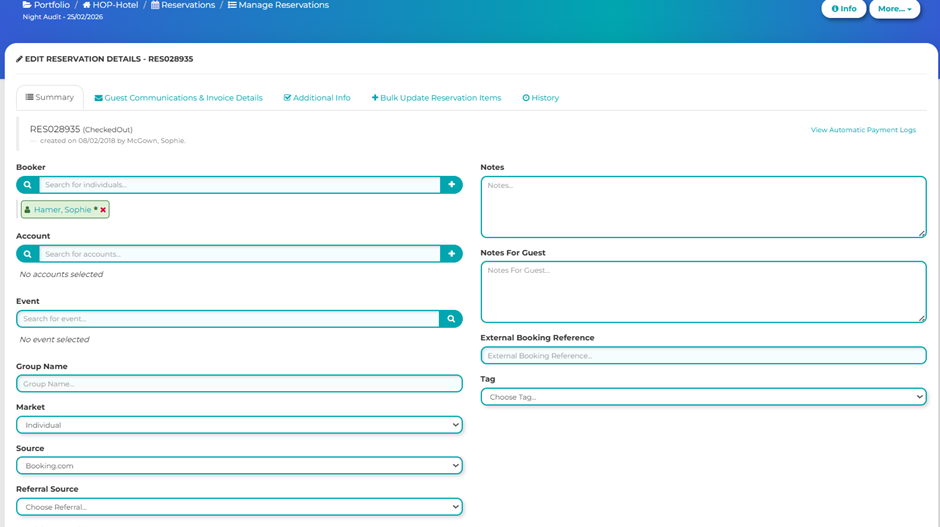
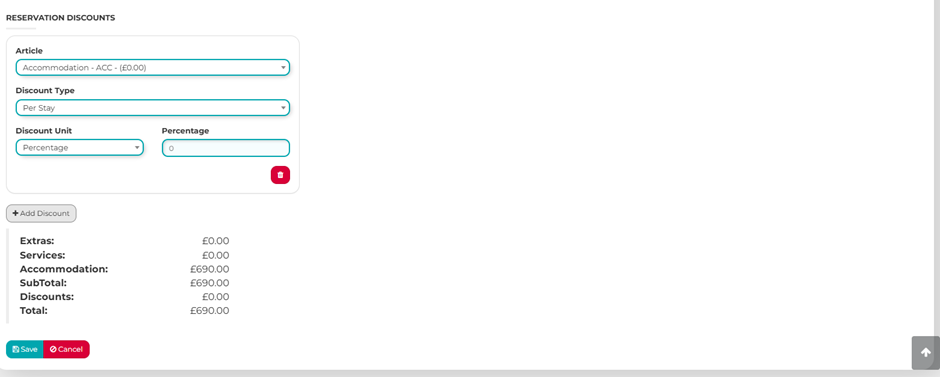
We’ve updated the Manage Reservation screen to improve usability, efficiency, and overall visibility. By grouping key fields more logically, we’ve reduced clutter and made it easier to quickly find and update important information. The addition of a clear cost summary provides better financial transparency at a glance, while the new reservation-level discount feature offers greater flexibility when applying adjustments. Together, these enhancements streamline workflows, minimise errors, and give you greater control over each reservation from a single, intuitive interface.
You will now see the Manage Reservation screen organised into up to five tabs (if Custom Fields are enabled). The most significant updates are within the first two tabs, where key fields have been streamlined and thoughtfully grouped to create a more intuitive and efficient user experience.
Guest Communications and Invoice Details
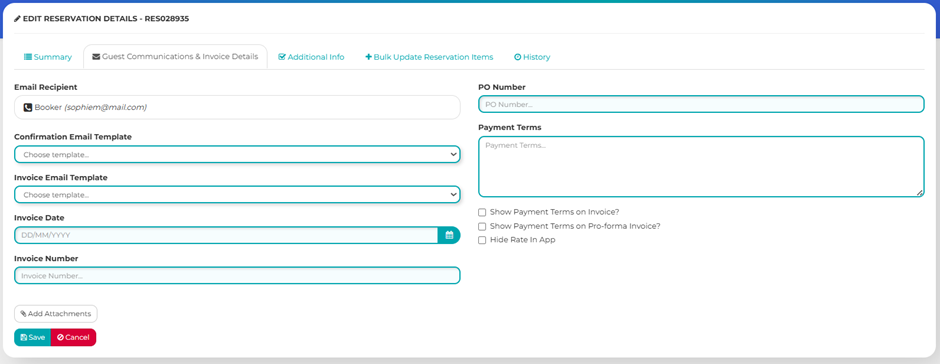
All your email communication settings and invoice details are now centralised in one convenient location, making it easier to manage correspondence and billing information. From this section, you can configure your email templates, ensure invoice details are accurate and up to date. Additionally, you can attach supporting documents and upload relevant files directly to the reservation, keeping everything organised and accessible in one place.
Was this article helpful?
That’s Great!
Thank you for your feedback
Sorry! We couldn't be helpful
Thank you for your feedback
Feedback sent
We appreciate your effort and will try to fix the article