We use cookies to try and give you a better experience in Freshdesk.
You can learn more about what kind of cookies we use, why, and how from our Privacy policy. If you hate cookies, or are just on a diet, you can disable them altogether too. Just note that the Freshdesk service is pretty big on some cookies (we love the choco-chip ones), and some portions of Freshdesk may not work properly if you disable cookies.
We’ll also assume you agree to the way we use cookies and are ok with it as described in our Privacy policy, unless you choose to disable them altogether through your browser.
Feature Release Notes 14/10/2026
1. Group Reservation Screen
Simplified Group Reservation Screen
We have redesigned the Group Reservation screen to provide a cleaner, more modern and user-friendly experience. The previous layout has been replaced with a streamlined accordion-style design, making it easier to manage individual rooms and their associated details.
The overall group reservation creation process remains the same, but several improvements have been introduced to give you greater control over how reservations are configured.
Adding Extras, Services and Discounts Per Room
Previously, extras and services were added against the total number of rooms within a group booking. With this update, you can now assign extras, services and discounts to individual rooms, providing greater flexibility when managing group reservations.
To add these items to a specific room:
This allows each room within the group booking to have its own individual requirements.
Assigning Guests to Individual Rooms
We have introduced the ability to assign guests to individual rooms during the group reservation creation process.
Previously, you would assign a main booker when creating the group reservation and then add the individual guests after the booking had been created. You can now allocate guests to their respective rooms from the outset, making the process more efficient and reducing the need for additional steps after creation.
Updating Rates for Group Reservations
We have improved the way rates can be managed when creating group reservations, giving you the choice of updating rates across all rooms or adjusting them individually.
Update rates across all rooms
By default, rates can be updated across all rooms within the group reservation. This is ideal when the same rate structure applies to the entire booking.
Update rates per room
By selecting the relevant checkbox, the rate fields will be displayed against each individual room. You can then amend the nightly rates separately, allowing different rooms within the same group booking to have different rates where required.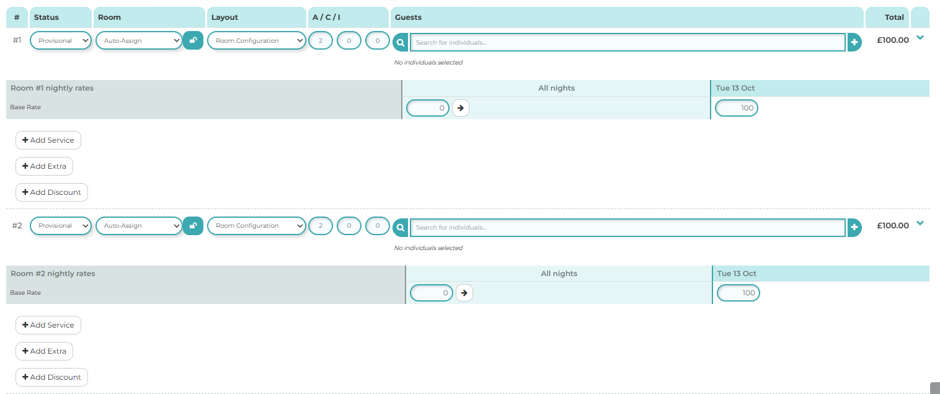
Managing Occupancy Supplements
You can also amend occupancy supplements directly from the nightly rates section by selecting the relevant option next to the nightly rates.
Occupancy supplements can be updated across all rooms or, when the per-room rate option is enabled, adjusted individually for each room. This provides greater flexibility when different rooms have different occupancy requirements.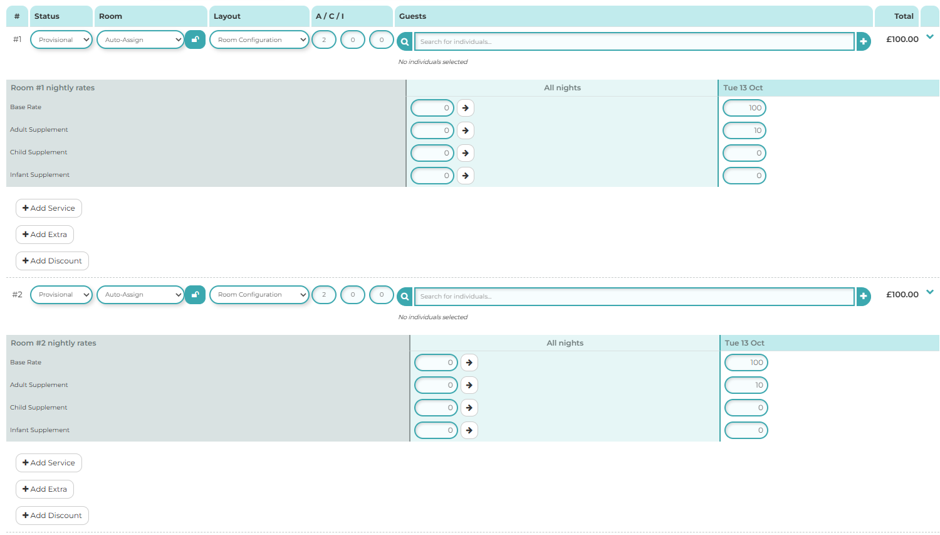
2. Transaction Grouping
Improved Transaction Grouping by Room
We have updated how transactions are grouped when multiple reservations have charges posted on the same date.
Previously, transactions were grouped together based on their posting date. This meant that charges from multiple rooms could appear under a single date heading, making it more difficult to distinguish which transactions belonged to each room.
With this update, transactions are now grouped by posting date and room, making it easier to identify and review charges associated with individual rooms.
For example, in a two-room booking, transactions posted on the same date will now appear under separate entries for each room rather than being combined under one date heading.
In the example below:
This improvement provides clearer transaction breakdowns for multi-room reservations, helping users identify and reconcile charges against the correct room more easily.
0 Votes
0 Comments
Login or Sign up to post a comment